back

guillotine

behead your peaks

vst free available now
latest 1.2.3 2026-06-11
full changelog ↓
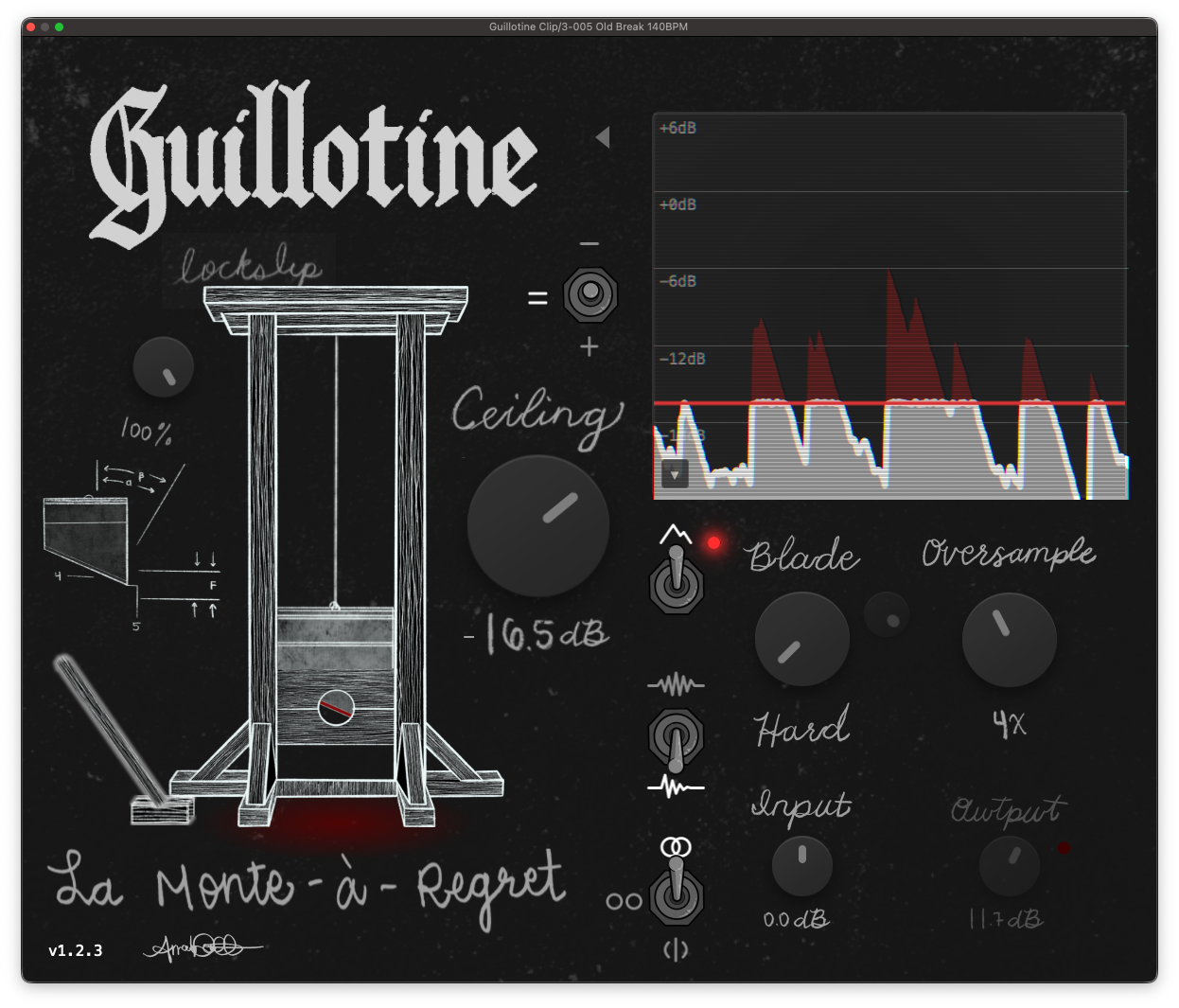
Guillotine plugin UI
// features
  • 7 saturation curves, from hard to soft knee, with 1x to 32x oversampling
  • Microscope view: watch the waveform, red shows what the blade is taking off
  • Delta monitor: solo the signal being clipped and hear it on its own
  • Parallel dry/wet, input drive, ceiling from 0 to -60 dB
  • Mac / Windows / Linux
// changelog
1.2.3 2026-06-11

Hotfix: FL Studio Dry/Wet bug, round two (#1)

Turns out 1.2.2 only partially fixed this one. With oversampling above 1x, FL's inconsistent buffer sizes were still knocking the dry signal slightly out of sync with the wet signal, so mixing the two created constant fuzzy buzzing. The dry path now stays sample-locked to the wet path at every buffer size and oversampling setting. Confirmed fixed in FL this time for the last time, probably.

1.2.2 2026-06-10

Dry/Wet destroying audio in FL Studio (#1)

Some hosts (like FL Studio) send dynamic buffer sizes to plugins that might be larger than expected. Because of this Guillotine was overflowing its internal dry buffer, meaning whenever we'd mix dry and wet signal the output would completely collapse into crazy loud distorted garbage samples. This should no longer happen.

Edit: Incomplete fix... see https://github.com/noahbaxter/guillotine/releases/tag/v1.2.3

1.2.1 2026-02-16

Improvements

Output Clip Indicator

A red LED next to the output knob lights up when the output signal exceeds 0 dBFS. Basically this tells you that either

  • Manually set output gain is too high and should be reduced
  • True Peak is off and you're getting momentary overshoots (either increase oversampling or turn it back on)

Mix/Output Gain Compensation

Previously the plugin applied the output gain as a final stage before output which means that when makeup gain is used to compensate for heavy clipping, the dry signal at 0% increases in volume dramatically. Now all output gain is scaled directly by the mix amount, meaning no output gain is applied at 0% wet. This makes it easier to mix in heavily clipped signals without drastically boosting the original dry. Note: this means that any mix value with gain compensation applied may result in > 0dB output since you're basically just adding back peaks to a boosted clipped signal. Something to be aware of

1.2.0 2026-02-15

New Features

Gain Mode Toggle

Three-way toggle above the output knob: Manual, Match (=), and Maximize (↑).

  • Match mode (new default) auto-compensates output gain so clipped audio stays at roughly the same perceived loudness. Blends between transient and tonal reference signals based on ceiling depth — light clipping assumes drum-like content, heavy clipping assumes sustained content. A small progressive reduction prevents over-compensation at extreme settings.
  • Maximize mode boosts output by exactly the ceiling amount, bringing it back to 0 dBFS.
  • Manual mode gives you full control of the output gain knob.

Basic/Advanced View

Click the arrow on the right edge to collapse the settings panel. Your preference is remembered across sessions.

Update Checker

A small notification dot appears when a new version is available on GitHub. Click it to go to the release page.

Improvements

  • Renamed to "Guillotine Clip" for easier DAW search — type "clip" and find it immediately
  • Scale menu no longer renders behind the microscope blade

Bug Fixes

  • Fixed missing mix label image reference
  • Auto-reconfigure CMake when VERSION or CMakeLists.txt changes
  • Fixed CI and installer paths for the plugin rename

Internal

  • Unit test runner script (scripts/test.sh)
  • Auto gain invariant tests (property-based, no hardcoded values)
  • Updated clap-juce-extensions submodule
1.1.3 2026-02-13

What's New

Bugs

  • Fixed envelope not render at the correct level
  • Fixed enforce ceiling UI toggle not properly syncing with internal plugin parameter

Microscope Overhaul

  • Gridlines now show associated dB values for clarity
  • Scale options for both level (dB) and time (s)

Documentation

  • Noted that linux users MUST download WebKitGTK for plugin UI to display

Downloads

Platform Formats File
macOS VST3, AU Guillotine-1.1.3-macOS.pkg
Windows VST3 Guillotine-1.1.3-Windows-x64.exe
Linux VST3, LV2, CLAP Guillotine-1.1.3-Linux-x64.zip
1.1.2 2026-01-26

What's New

Linux Plugin Formats

  • Added LV2 and CLAP formats for Linux builds

For Developers

  • GUILLOTINE_DEFAULTS support for demo/embed initialization
  • Web asset paths now work correctly when used as a submodule
  • Added GPL-3.0 license file

Downloads

Platform Formats File
macOS VST3, AU Guillotine-1.1.2-macOS.pkg
Windows VST3 Guillotine-1.1.2-Windows-x64.exe
Linux VST3, LV2, CLAP Guillotine-1.1.2-Linux-x64.zip
1.1.1 2026-01-25

Changes

  • Fixed filter type tooltip labels (Linear Phase / Minimum Phase now display correctly)
  • Fixed Windows installer failing when plugin files were locked by DAW
  • Removed font cycling feature (simplified UI)

Downloads

Platform File
macOS Guillotine-1.1.1-macOS.pkg
Windows Guillotine-1.1.1-Windows-x64.exe
Linux Guillotine-1.1.1-Linux-x64.zip
1.1.0 2026-01-24

What's New

Proper Installers

No more manual file copying or Gatekeeper warnings (on macOS).

macOS - Signed and notarized .pkg installer

  • Double-click to install
  • No security warnings - passes Gatekeeper
  • Installs VST3 and AU to /Library/Audio/Plug-Ins/

Windows - .exe installer

  • Standard install wizard
  • Installs VST3 to C:\Program Files\Common Files\VST3\
  • Note: Not code-signed, so SmartScreen may warn on first run (click "More info" → "Run anyway")

Linux - .zip archive

  • Extract to ~/.vst3/

Other Changes

  • CI now automatically builds and packages installers for all platforms
  • Linux VST3 builds included in releases
1.0.3 2026-01-24

What's New

Dry/Wet Mix

  • New Dry/Wet knob for parallel clipping
  • Phase-coherent mixing - dry signal passes through matched filters so wet and dry stay aligned
  • Works correctly with all oversampling rates and filter types

Bug Fixes

  • Fixed potential overshoot in Mid-Side mode when True Peak is enabled (M/S decode could exceed ceiling)

For Developers

  • Phase coherence test suite for dry/wet mixing
  • True clip tests covering M/S decode edge cases
1.0.2 2026-01-17

What's New

New Controls

  • Filter Type toggle - Switch between Minimum Phase (low latency) and Linear Phase (no phase distortion)
  • Stereo Mode toggle - Choose Stereo Link, L/R independent, or Mid-Side processing
  • True Peak toggle - Hard limiter that guarantees ceiling is never exceeded

Stability & Performance

  • Fixed audio thread race condition when changing oversampling settings mid-playback
  • Fixed memory allocations in audio processing (all buffers now pre-allocated)
  • Smoother parameter automation - ceiling and curve exponent changes no longer cause clicks
  • Thread-safe peak meters for UI display

For Developers

  • Atomic peak meter implementation
  • Deferred oversampler rebuild pattern for thread safety
1.0.1 2026-01-16

What's New

Microscope Display

  • CRT-style visual effects (scanlines, vignette, subtle jitter)
  • Zoom presets via dropdown or scroll wheel (12dB to 60dB range)
  • Reference gridlines at 12dB intervals
  • Smoother waveform rendering at tight zoom levels

Delta Mode

  • Remembers your preference when bypassing the clipper
  • Smooth color transition when toggling

Bug Fixes

  • Waveform scroll speed no longer affected by sample rate or buffer size
  • Fixed waveform edge glitches (visual tearing at buffer boundaries)
  • Fixed silent signal display (was rendering incorrectly instead of flat)
  • Fixed UI flash when plugin loads
  • Fixed keyboard focus issues in DAW

For Developers

  • Switched to binary envelope data transfer (better performance)
  • Switched to pure CMake build system, removed Projucer
  • Fixed standalone builds caching wrong architecture
1.0.0 2026-01-01

Guillotine v1.0.0

Installation

  • Windows: Extract and place Guillotine.vst3 folder in your VST3 directory
  • macOS: Extract and copy VST3/AU to ~/Library/Audio/Plug-Ins/
  • Linux: Extract to ~/.vst3/ or your DAW's VST3 directory

macOS Security Notice

macOS may block the plugin because I didn't pay Apple $100 it's from an unidentified developer. To fix this:

  1. Copy the plugin files to your Audio/Plug-Ins folder
  2. Open System SettingsPrivacy & Security
  3. Scroll down to the Security section
  4. You'll see a message about "Guillotine" being blocked - click Open Anyway
  5. Repeat for both VST3 and AU if using both formats