back

chartchotic

midi for gamers

reaper free available now
latest 1.2.3 2026-04-26
full changelog ↓
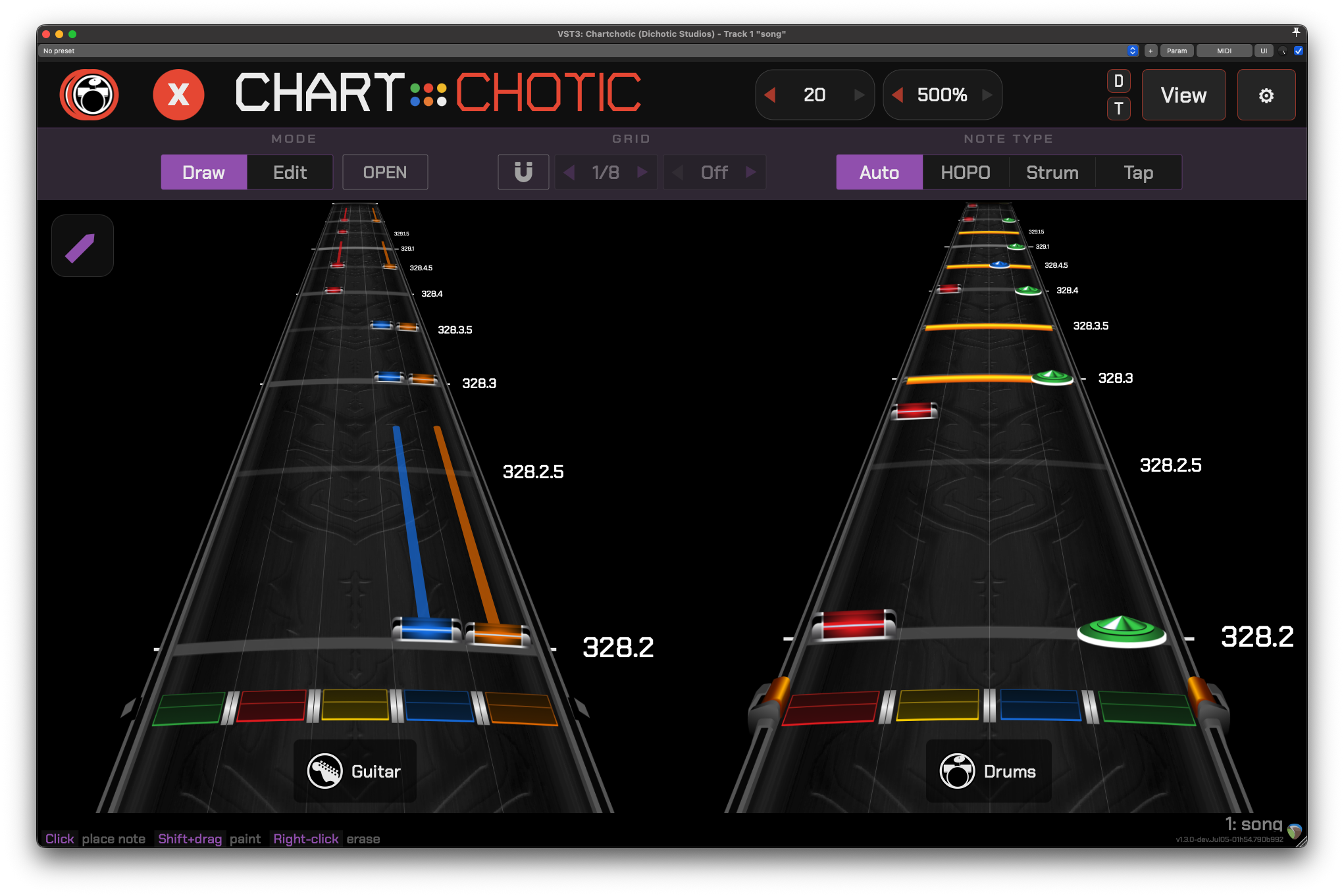
Chartchotic plugin UI
// features
  • Multi-highway: up to 4 instruments or difficulties at once (guitar, bass, keys, drums, rhythm, co-op)
  • Guitar: notes, chords, sustains, HOPOs, opens, taps, trill and tremolo lanes
  • Drums: standard and Pro Drums, cymbals, 2x kick, ghost/accent dynamics, disco flip
  • Reaper integration: auto-discovers tracks by name, zero-latency scrubbing, live updates
  • VST3 / AU, Mac / Windows / Linux (Reaper fully supported)
// changelog
1.2.3 2026-04-26

Bug Fixes

  • REAPER no longer hangs when duplicating a track containing chartchotic
  • Rendering engine improvements to prevent note drift
  • Bar widths fit more cleanly within the highway
  • Realigned cymbal modifier assets for ghosts/accents
  • Scrolling on popup windows no longer moves the highways
1.2.2 2026-04-03

Bug Fixes

  • Fix instrument icon drifting off-center at small window sizes (#22)
  • Fix instrument and difficulty selection not persisting across UI reloads (#23)
  • Fix wrong-color note flash when switching between instruments
  • Overlay menus and tooltips now inherit host DPI scaling (shouuuld fix #21)
  • Update prompt no longer nags every time the plugin window is opened

Quality of Life

  • Minimum window width reduced to 200px for tighter multi-instance layouts (#20)
1.2.1 2026-03-30

Track Discovery Toggle

  • New Track Discovery setting controls how the plugin decides what MIDI to render and as which instrument.
  • On (default): Scans the project for tracks with standard names (PART GUITAR, PART DRUMS, etc.) and populates the instrument selector with what it finds. You choose which parts to view, one at a time or multiple at once.
  • Off: Reads MIDI from whatever track the plugin is placed on. No name matching, no project scanning. You just tell it whether to render as a 5-lane guitar-style highway or a 4-lane drum-style highway.
  • Use discovery off for custom MIDI, non-standard track names, or if detection is picking up the wrong tracks.

Track Status Bar

  • Footer now shows the current track name and number so you always know what the plugin is reading from.

Bug Fixes

  • Fix sync calibration offset jumping when playback crosses a tempo change

Quality of Life

  • Tooltips on non-obvious controls (discovery toggle, calibration, latency, disco flip, HOPO threshold)
  • HOPO threshold simplified to three levels: Tight (120), Default (170), Loose (240)
1.2.0 2026-03-21

Easily the biggest release since 1.0. Multi-highway support turns Chartchotic into a full band view (or full difficulty if you prefer).

Multi-Highway

  • Just place one instance of Chartchotic in your reaper project and it now automatically discovers all instruments and can display up to 4 at once! (or individually as you wish)
  • REAPER tracks must use standard names to be detected: PART GUITAR, PART BASS, PART DRUMS, PART KEYS, PART RHYTHM, PART GUITAR COOP
  • Click any instrument or difficulty icon to select it, shift click to toggle multiple at once, or "All" to show everything
  • Live track detection. Add, remove, or rename REAPER tracks and the plugin highways update in real time

Bemani Mode

  • As an alternative to perspective Harmonix-style scrolling, Bemani mode introduces flat vertical scrolling inspired by IIDX/SDVX/DDR. Toggle ビーマニ to switch view modes.
  • Highway length scales with slot height. Taller slots show more notes and match the relative speed in perspective mode.

Performance

  • Major architecture rework under the hood. Multi-highway rendering shares work across all visible highways instead of duplicating it, so 4 highways doesn't mean 4x the cost
  • Resizing the window and changing perspective settings no longer freeze the UI
  • Switching instruments or difficulties is now instant with no stutter or dropped frames

Bug Fixes

  • Fix drum highway misalignment with lanes and bar notes
  • Fix highway texture jumps at tempo changes
  • Fix toolbar state persistence when moving the plugin between tracks

Quality of Life

  • Viewport-based window resizing (no more auto-resize surprises)
  • 0ms latency buffer option for the lowest-latency setups

IMPORTANT

  • 1.2.0 is optimized for REAPER. All other DAWs are not actively supported at this time, but stay tuned for revamped alternate DAW support in future updates.
1.1.0 2026-03-14

Window Resizing

  • Highway length now adjusts window height automatically
  • Boosted highway length to 500%, slider moved next to note speed in top bar
  • Free resize mode (settings toggle) lets you stretch the window to any shape you want

Visual

  • Higher resolution strikeline and note assets
  • Guitar and drums now scale consistently at the same highway length setting
  • Extended highways no longer clip at the top of the viewport
  • Subtle perspective improvements for more consistent note placement
  • Difficulty selector reversed - Expert on top

Disco Flips

  • Pro Drums: automatic red<->yellow lane swap during disco flip sections
  • Reads [mix 3 drums*d] text events from MIDI
  • Visible start/end markers on the highway so you can see exactly where flips happen
  • Toggle in View menu when pro drums cymbals are enabled

Other

  • Proper Linux builds - VST3 and LV2 format!
  • Skin override directory for building plugin with custom assets - see docs/SKINNING.md
  • Fix texture tile loop causing infinite spin at narrow widths
1.0.0 2026-03-09

This is the official 1.0 release of Chartchotic. This ground-up overhaul consists of a rewritten rendering engine, brand new UI, and comprehensive improvements to every visual asset.

Rendering

  • New chart rendering engine runs significantly leaner with smoother frametimes, capped at 15/30/60fps or your native display refresh rate
  • Improved 3D perspective with curved fretboard placements for notes and other glyphs

Assets

  • All assets have been rerendered at a higher resolution from vector sources
  • New ghost note, tap note, and accent overlays for drums and guitar
  • New SP white variants for all assets and hit indicators

Highway

  • Highways have textures now - use one of the bundled textures (courtesy of kanaizo), or add your own
  • Adjustable highway length up to 300% longer than standard

Notes & Animations

  • Adjustable sizes for note gems and kick/open bars
  • Hit animations follow the highway curvature now
  • Star Power kicks and opens flash white on hit

UI

  • Renamed from Chart Preview to Chartchotic with a new logo
  • Major UI overhaul - redesigned toolbar, cleaner layout, consistent scaling
  • Revamped chart toggles - organized controls for hiding/showing modifiers, chart elements, and scene layers
  • Double-click most number values to type directly
  • Calibration now supports negative latency up to -200ms
  • Note speed reworked to integers 2–20, matching CH/YARG conventions
  • Update notifications when a new version has launched

Infrastructure

  • CMake build system with automated CI/CD on all platforms
  • macOS code signing and notarization with .pkg installer (no more Gatekeeper warnings)
  • Windows installer via Inno Setup
  • Pluginval validation on Windows builds

Bug Fixes

  • Fixed Star Power animation color when starting playback mid-sustain
  • Fixed modifier notes rendering invisible over orange lane
  • Fixed playhead crash in standalone mode
0.9.5 2025-10-30
  • Fix modifier notes rendering as GEM::NONE over orange lane, blocking orange notes from rendering with modifiers
0.9.4 2025-10-29
  • Unique hit animations for open guitar notes
  • REAPER: mouse scroll to move timeline forward/backward, shift for precision
  • REAPER: automatic MIDI track detection, removed manual track selector UI
  • REAPER: more efficient bulk-fetched MIDI data
  • Fix green guitar notes positioned incorrectly
  • Fix 0-tick and 1-tick notes failing to render (Moonscraper exports these)
  • Fix hit animations not triggering when starting playback mid-sustain
  • Fix Z-ordering for hit animations being cut off by notes
  • Major refactor to MIDI processing, rendering pipeline, and REAPER API handling
0.9.3 2025-10-17
  • Major performance fixes for live updating while paused
  • Fix star power not displaying at all (regression)
0.9.2 2025-10-12
  • Manual latency offset textbox (-2s to +2s)
  • Throttle REAPER MIDI polling while paused (max 20Hz)
0.9.1 2025-10-12
  • Fix forced HOPOs not working on chords
  • Fix gridlines breaking halfway through measures during playback
  • Fix highway not updating when paused until cursor moves
  • Replace track number buttons with text box (type any number or UP/DOWN to scroll)
0.9.0 2025-10-11
  • REAPER integration: reads MIDI directly from timeline instead of realtime buffers
    • Zero latency between cursor movement and note display
    • Timeline scrubbing while playback is stopped
    • Track selector from within the plugin
  • Hit animations during playback (toggleable)
  • Highway rendering switched to seconds-based (fixes time sig/BPM change glitches)
  • Version number display in bottom left corner
  • Fix HOPOs not working for chords
0.8.0 2025-09-02
  • Cross-platform CI builds (macOS universal binary, Windows, Linux)
  • Installation improvements across all platforms
0.7.0 2025-08-27
  • Linux support
  • Note sustains implemented
  • General performance/stability improvements
  • Fix certain notes never displaying
  • Fix settings not persisting across session reloads
  • Optimized build system (Windows bundles reduced from 32MB to ~2MB)
0.6.0 2025-08-18
  • User-selectable latency (250ms–1s)
  • 60fps rendering (much smoother, more CPU efficient)
  • Fix note render layering (kicks above hits, double notes on note-offs)
  • Proper 3D perspective replacing previous fake-out scaling
  • Meter grid lines with proper measure starts and time sig change support
  • Tick-based positioning refactor
0.5.0 2024-06-25
  • Initial feature-complete drum charting experience
  • Guitar and drum note rendering
  • Basic settings (skill level, instrument, framerate)